
Alternate format: Improving cyber security resilience through emergency preparedness planning – ITSM.10.014 (PDF, 695 KB)
Foreword
This is an unclassfied publication that has been issued under the authority of the Head of the Canadian Centre for Cyber Security (Cyber Centre). For more information, contact the Cyber Centre:
email contact@cyber.gc.ca |Mobile 613-949-7048 or 1‑833‑CYBER‑88
Effective date
This publication takes effect on January 2026.
Revision history
- First release: January 2026
Overview
Cyber emergency preparedness is the practice of ensuring that your organization has a strategy to prevent, respond to, and recover from cyber incidents. Implementing a cyber emergency preparedness strategy requires a collaborative effort from stakeholders across your organization. Your strategy should highlight key aspects of your emergency procedures, such as the steps your organization will take to respond to an incident, who will be contacted in case of an incident, and what resources will be required to carry out your overall plan. A cyber emergency preparedness strategy will help your organization to manage risks and improve resilience in the face of catastrophic events.
This publication describes emergency preparedness, related to cyber security, as a strategy that encompasses an incident response plan (IRP), a business continuity plan (BCP), and a disaster recovery plan (DRP). The difference between these 3 plans is detailed in this publication, along with the justification for why your organization should develop and implement all 3 plans to improve your cyber resilience and ability to maintain business operations amid an incident or a major disruption.
Your emergency preparedness plan should align with a relevant security risk management framework, such as:
- the Cyber Centre IT Security Risk Management: A Lifecycle Approach (ITSG-33)
- the National Institute of Standards and Technology (NIST) Cyber Security Framework
- the International Organization for Standardization (ISO) ISO/IEC 27002:20122 Information security, cybersecurity and privacy protection — Information security controls
Integrating your emergency preparedness plan into your organization's security framework will help improve your cyber security resiliency and provide the security assurances of confidentiality, integrity, and availability for your business assets.
We recommend that you report cyber incidents to the Cyber Centre using our online reporting tool. We can provide your organization with cyber security advice, guidance, and services to help mitigate the impact of cyber incidents and better protect your organization from future incidents. We also encourage you to report cybercrime activities to law enforcement and fraud to the Canadian Anti-Fraud Centre.
1 Introduction to emergency preparedness
You should strive to improve your organization's cyber security posture and resilience by proactively preparing for incidents and disruptions to anticipate and minimize operational downtime, financial losses, and reputational damage.
Your cyber emergency preparedness strategy should include 3 comprehensive plans:
- incident response plan (IRP)
- business continuity plan (BCP)
- disaster recovery plan (DRP)
This publication focuses on emergency preparedness activities related mainly to the recovery and restoration of tangible and intangible technology assets that are used for business operations and can be adversely affected by a cyber event.
Although this publication focuses on cyber security, the recommendations align with Public Safety Canada's (PSC) Emergency Management guidance and Emergency Management Framework for Canada. Through national leadership in the development and implementation of policies, plans, and a range of programs, PSC's emergency management guidance helps Canadians protect themselves from various emergencies and disasters. PSC's approach to emergency management is based on work in 4 related areas:
- prevention and mitigation
- emergency preparedness
- response to emergency events
- recovery from disasters
The PSC framework aims to guide and strengthen the way governments and partners assess risks and work together to prevent, mitigate, prepare for, respond to, and recover from the threats and hazards that pose the greatest risk to Canadians. Building on the framework, PSC's Emergency Management Strategy for Canada: Toward a Resilient 2030 identifies federal, provincial, and territorial priorities that will strengthen Canada's resilience by 2030. Potential threats include natural disasters, such as forest fires, and human-induced disasters, such as hazardous material spills. We recommend that you develop emergency preparedness strategies for these other types of threats as well.
1.1 Benefits of an emergency preparedness plan
Disruption due to unforeseen events can have devastating impacts on your organization and its cyber security posture. Having a comprehensive cyber security emergency preparedness plan can:
- lessen the severity of disruption and damage to business operations and services
- minimize recovery time and allow for rapid restoration of services
- improve security
- minimize the financial impact of the disruption
- prevent reputational damage
- potentially prevent regulatory or legal penalties, when an emergency preparedness plan is mandatory
- offer alternative ways to continue operations
- train and educate employees on emergency procedures
- help identify incidents and deploy rapid restoration of services
1.2 Comparing incident response, business continuity, and disaster recovery
The 3 comprehensive plans involved in your cyber emergency preparedness strategy are your IRP, BCP, and DRP. This section will compare all 3 plans and highlight the differences between each.
1.2.1 Incident response plan
An IRP includes the processes, procedures, and documentation related to how your organization detects, responds to, and recovers from a specific incident. The plan will help minimize your organization's downtime and overall business disruptions when faced with an incident. A robust IRP covers various types of incidents that could impact your organization and provides step-by-step guidance on how to handle an incident, mitigate the related risks, and recover quickly. Some examples of cyber incidents that can impact your organization's cyber security posture include:
- ransomware: when a type of malware locks you out of your files or systems and a threat actor demands that you pay a ransom to regain access. Payment does not guarantee you will regain access to your information
- data theft: when threat actors steal information stored on servers and devices
- active exploitation: when threat actors take advantage of unpatched software, hardware, or other vulnerabilities to gain control of your systems, networks, and devices
1.2.2 Business continuity plan
A BCP is a specific plan to recover services most critical to an organization's operations as quickly as possible. It is a proactive plan that describes operational procedures to help organizations ensure they can continue business operations despite a disruption. The BCP will identify the main assets, roles, responsibilities, and processes needed to ensure ongoing operations.
Your BCP should be based on your organization's information technology (IT) threat and risk assessment (TRA) and a business impact analysis (BIA). A BIA will identify the potential impact of different scenarios on your business operations. For example, a BIA should address the following questions:
- What resources and activities are critical to continuing your business operations?
- How long can you stop operations without causing significant damage to your business?
- What are the financial implications of these interruptions?
A BIA outlines the projected financial costs associated with different disruptions (where applicable) so that you can make informed investments in the prevention and mitigation strategies described in your BCP.
1.2.3 Disaster recovery plan
A DRP is a formal document that defines a set of procedures and processes and the specific roles and responsibilities of key members to return the organization to its normal state after a large event.
Most DRPs include a shift in the physical location of either server-side infrastructure (for example, changing data centres) or client-side endpoints (for example, changing offices), depending on which side suffered the disaster (for example, data centre flood or office evacuation). A DRP should also specify recovery objectives for all critical assets and steps to reduce the loss or impact to the organization.
A DRP encompasses the main principles of an IRP and a BCP and can provide guidance on what plan to execute based on the type of disruption or incident.
1.2.4 Main difference between each type of plan
IRPs, BCPs, and DRPs have much in common since they are all meant to improve your organization's resilience, minimize impact, and keep operations running. However, they do have some key differences.
An IRP is event focused and specific to a security incident, such as a cyber attack, affecting an organization. It defines the roles and responsibilities and identifies the scope of action required to mitigate an incident (for example, a data breach, a ransomware attack, or a phishing attack). IRPs will assist your incident response team in reducing organizational downtime.
A BCP is a specific plan to quickly resume only the most critical operations, as defined by the BIA, in the event of a disaster. It will typically address which services to prioritize, identify the critical staff required to run those services, and identify an offsite location from which to set up temporary operations.
A DRP is a holistic plan to return your organization to full operations after a disaster. It will address various types of disruptions, such as natural hazards, hardware and power outages, and cyber attacks.
Each of these 3 plans share the following elements that are essential to successful identification, management, response, and recovery during an event or incident:
- identifying a designated point of contact and designated team members and their alternates (in case of absences), and listing their specific roles and responsibilities
- scheduling periodic reviews to identify potential gaps in the plan and areas that need improvement
- scheduling testing for the plans by performing simulated disruptions to ensure that any gaps are fixed
Implementing these 3 plans will enhance your cyber security posture. Ensuring that you implement additional preventative security measures, such as patching and updating your IT assets, will reduce your organization's vulnerabilities and add to your incident preparedness. These additional security measures can help your organization avoid costly downtime and interruptions to your operations. In addition to developing and updating an IRP, BCP, and DRP, we encourage you to enhance your cyber security posture in the following ways:
- segment your networks to stop traffic from flowing to sensitive or restricted zones
- deploy firewalls to prevent unauthorized outside sources from accessing your system's resources or moving data from one area of your network to another
- install anti-virus and anti-malware software to protect your perimeter
- update and apply patches to operating systems, software, and firmware
2 Incident response planning
Cyber threats can greatly impact your network, systems, and devices. When you have a proper plan, you will be prepared to handle incidents when they happen, mitigate the threats and associated risks, and recover quickly.
This section will describe the preliminary elements that will help you better understand what is required to create an IRP that is tailored to your organization. We will identify the main steps that you should consider when developing your cyber security IRP and reference reputable guidance documentation that can assist you in developing your plan.
2.1 What to consider before creating an incident response plan
Developing a step-by-step IRP can be time consuming and feel overwhelming. Although your plan will be tailored to your organization's size, business operations, and security requirements, here are some preliminary and standard elements that organizations and businesses of all sizes should consider:
2.1.1 Conduct a threat and risk assessment
A TRA is a critical tool for understanding the different threats to your IT systems, determining the level of risk these systems are exposed to, and recommending the appropriate level of protection.
Before you create an IRP, your organization should conduct a TRA. The first step to a TRA is identifying all your critical assets. Once this has been done, rank the assets according to their importance, value, and risk level. This will allow you to create a budget and identify the tools and resources required to protect your valuable assets.
As previously mentioned, there are various types of incidents to consider when developing your IRP. Your plan should map out a variety of incident response scenarios to address the different types of threats. Conducting a TRA will help you identify the risks and potential threats to your organizational assets, as well as the likelihood and impact of a compromise.
2.1.2 Create a response team
Identify who has the qualifications to be on your response team and ensure that they understand their roles. Your response team should include employees with various qualifications and have cross-functional support from other business lines. The main goal of the response team is to coordinate resources to minimize the impact of the incident and resume business operations as soon as possible. The response team is responsible for assessing, documenting, and responding to incidents. They are also responsible for restoring your systems, recovering information, and reducing the risk of the incident reoccurring.
2.1.3 Develop policies and procedures
Your incident response activities need to align with your organization's policy and compliance requirements. Your organization should develop an incident response policy that establishes the authorities, roles, and responsibilities for your incident response processes and procedures. This policy should be approved by your organization's senior management and executives. Over time, your policies will need to be reviewed and adjusted based on your organization's business requirements.
2.1.4 Create your communications plan
Your communications plan should detail how, when, and with whom your team communicates. It should also identify who is responsible for these communications. The communications plan should include a central point of contact for employees to report suspected or known incidents, and alternate methods of communication in case the primary method is impacted by the incident. Many organizations prefer to use a designated individual to communicate with the press and public during incident recovery.
Your notification procedures are critical to the success of your incident response. Identify the key internal and external stakeholders who need to be notified during an incident. You may need to alert third parties, such as clients, suppliers, vendors, and managed service providers. Depending on the incident, you may also need to contact law enforcement or your regulating body if applicable, or consult with a lawyer for advice.
You may also be required to report the incident to the Office of the Privacy Commissioner of Canada (OPC) or the appropriate privacy legislation to which your organization is subject. For example, if your organization is subject to the OPC's Personal Information Protection and Electronic Documents Act (PIPEDA), you are required to:
- report to the OPC breaches of security safeguards involving personal information that pose a real risk of significant harm to individuals
- notify affected individuals about those breaches
- keep records of all breaches
The OPC's What you need to know about mandatory reporting of breaches of security safeguards provides an overview of what you need to know about these obligations.
2.1.5 Educate your employees
Update your employees on current incident response planning and execution. Tailor your training programs to your organization's business needs and requirements, as well as to your employees' roles and responsibilities. Run a tabletop exercise with the key employees identified in the plan. Your employees' cooperation can reduce the length of response time and facilitate the implementation of your IRP. Employees should also be trained on how to identify and report cyber attacks such as phishing emails, spear phishing attacks, and social engineering efforts.
2.2 Additional considerations for operational technology
Organizations that manage operational technology (OT) need to address and mitigate the risks associated with incidents that can lead to unplanned outages and impacts to both their IT systems and their OT systems.
OT and industrial control systems (ICS) can add complexity to the environment and have unique constraints that need to be addressed. For example, many ICS are deployed without robust security controls and must run continuously, even though they use unsecure protocols and architectures. Maintaining older equipment can be challenging and vendors are often unable to provide replacements for vulnerable hardware or software, which can make it difficult to prevent and respond to ICS incidents.
The following 3 Cyber Centre publications provide security advice to organizations that manage OT systems, ICS, and critical infrastructure:
- Protect your operational technology (ITSAP.00.051)
- Security considerations for industrial control systems (ITSAP.00.050)
- Security considerations for critical infrastructure (ITSAP.10.100)
To learn more, read the additional guidance in PSC's Developing an Operational Technology and Information Technology Incident Response Plan. This publication provides organizations that operate a component of OT in their environment with a framework that can be used to develop a joint IT/OT cyber incident response plan (CIRP). The CIRP is intended to be appropriate for organization-specific business needs. The document provides a baseline approach to developing a CIRP, with specific factors to consider based on your organization's size, function, location, and sector.
When conducting a TRA on OT systems, it is important to consider the threats to these systems, the impact of systems vulnerabilities, and the types of risks that can cause disruptions to the operating environment.
Here are some examples of OT vulnerabilities to consider:
- obsolete systems: systems and components that are no longer supported with updates by the manufacturer
- unpatched software and firmware: leaves systems and devices vulnerable to known threats
- peripherals: external connected devices that can be exploited to compromise systems and networks
OT design typically prioritizes availability and process repeatability and reliability over data security. Compromised OT systems and devices can put critical processes at risk of failure. OT compromises can lead to the following impacts on your organization:
- major accidents and disasters, like injury or loss of life
- malfunctioning equipment and disrupted processes and deliverables
- compromised intellectual property and sensitive information
- lost revenue from disrupted processes, costly repairs, or paid ransom
- damaged organizational credibility
- compromised security measures, such as emergency services
The failure of an OT device could impact an entire industrial process and the safety of operators and the wider public. Destruction and loss of services could cause serious damage to high-value systems, processes, and infrastructure.
When developing an IRP, it is important for organizations that are managing OT systems to understand the unique implications affecting them. This will allow for better preparation and defence against future IT and OT incidents and disruptions. Choose a response team that has the capabilities and resources required to address and mitigate the risks associated with OT incidents.
2.3 Guidance for creating an incident response plan
This section references trusted resources to help you develop your IRP. For an introduction on incident response planning, preliminary requirements, and to understand why it is important for your organization, read the Cyber Centre's Developing your incident response plan (ITSAP.40.003).
The Cybersecurity and Infrastructure Security Agency's Cybersecurity Incident & Vulnerability Response Playbooks (PDF) present one playbook for incident response and one for vulnerability response. The playbooks provide a standard set of operating procedures for responding to and recovering from incidents and vulnerabilities affecting systems, data, and networks.
For additional guidelines on incident management, read ISO 22320:2018 Security and resilience — Emergency management — Guidelines for incident management. This document is applicable to any organization and provides guidance on how to handle incidents of any type and scale.
The 2 most-used incident response frameworks were created by the NIST and SysAdmin, Audit, Network, and Security (SANS) Institute:
- The NIST SP 800-61: Computer Security Incident Handling Guide (PDF) is a 4-step process for incident response and it is defined as a cyclical process where ongoing improvements are made to the plan based on lessons learned throughout the incident lifecycle. The NIST incident response steps are:
- Preparation
- Detection and analysis
- Containment, eradication, and recovery
- Post-incident activity
- The SANS Institute's Incident Handler's Handbook provides a structured 6-step process for incident response. It outlines the foundation required for organizations to build upon when developing their own incident response policies, standards, and roles and responsibilities for their response team. The 6 steps for incident response planning described in the handbook are:
- Preparation
- Identification
- Containment
- Eradication
- Recovery
- Lessons learned
The main difference between these 2 frameworks is that NIST combines containment, eradication, and recovery into one step, whereas the SANS Institute framework separates them into individual steps. The reason for this is that NIST believes these 3 components may sometimes overlap and need to be addressed in conjunction with one another.
2.4 Main steps in an incident response plan
Having an IRP helps your organization handle incidents, mitigate threats and associated risks, and recover quickly. In this section, we will outline the main steps of an IRP and specific actions your organization will take to develop your IRP.
2.4.1 Preparation
The preparation phase should begin before the incident occurs. This is when you will need to establish the right tools and resources to implement your IRP. This phase requires periodic reviewing and updating to address new emerging threats. In this phase, you should:
- Perform a TRA to identify your most valuable assets that are critical to your business operations, including sensitive or proprietary data
- Define the type of security incidents that your organization is most likely to face and create detailed response steps for these incidents
- Implement an IT asset management plan and associated policies to inventory and track all your organization's IT assets and services
- Include hardware, software, and data, indicating the level of importance, model and serial number, location, cost to replace, manufacturer, and whether it is owned or requires a subscription renewal, such as when using cloud-based software or software as a service
- Develop and document your security policies, standards, and procedures supporting incident response
- Develop and implement a backup plan
- Determine where you will do full, differential, or incremental backups
- Ensure your backups are stored offline
- Create your response team and assign roles and responsibilities to each member
- Establish a clear chain of command from the start
- Ensure that your employees are properly trained on how to execute their roles and responsibilities
- Define your communications plan to ensure that the proper members respond to an incident
- Include criteria for escalation
- Identify how key stakeholders and management will be informed throughout the lifecycle of the incident
- Create and run mock incident drills to evaluate your IRP
- Refine and update protocols and procedures
- Ensure that the response team understands their roles and responsibilities
2.4.2 Detection and analysis
This is the phase where you will determine if your organization has been breached or if any of your systems have been compromised. You will need to analyze the incident and identify its type, its origin, and the extent of damaged caused. This is usually the most challenging phase of the incident response process, but it cannot be overlooked. This step is a prerequisite to containing, analyzing, and eradicating the threat.
Incident detection can be done using automated security tools, or by receiving a notification and information from people within your organization or from external sources, such as vendors and service providers. You should create a classification system that will help you triage your response to the threat based on urgency. This will make it easier to isolate your most vulnerable systems and those that are most affected by the threat, ultimately minimizing the damage to your organization. Your organization should also verify the incident to ensure there is a true positive.
2.4.3 Containment
The containment step is critical. The goal is to minimize the immediate impact of the incident and to prevent it from spreading and causing further damage to other systems. This is done by isolating or removing the threat; for example, shutting down a system or replacing it completely, disconnecting it from the network, or disabling certain functions. Ensure you have a redundant system backup so that your data is safeguarded from permanent deletion. Your backup will also help you restore your business operations in a timely manner.
Containment strategies and procedures will depend on the type of incident, the degree of damage that the incident can cause, and your operational requirements. Incident containment strategies are easier to implement if they are preestablished in the preparation phase, where your acceptable risk level would have already been defined.
If a containment plan is delayed, the threat actor could access and compromise other systems, which could lead to further damage to your organization. The containment step should cover short-term and long-term strategies, and system backups.
Here are some questions that can help you decide which containment strategy to implement:
- What damage does this incident pose to your organization?
- How important is it to preserve the evidence?
- How much time and resources are required to implement the strategy?
- How long can you afford to shut down your systems and stop business operations?
- How effective is your strategy? Will it offer full or partial containment?
2.4.4 Eradication
Once the incident has been contained, you need to conduct a root cause analysis to identify and remove all elements of the incident from the affected systems to prevent future compromises. The eradication phase will improve your defence strategies based on the lessons learned. In this phase, the following activities should be completed:
- identify all affected systems, hosts, and services
- remove all malicious content from affected systems
- scan and wipe your systems and infected devices to prevent risk of reinfection
- identify and address all residual attack vectors to ensure other systems are not compromised
- communicate with all stakeholders to ensure they manage the incident appropriately
- harden, patch, and upgrade all affected systems
- upgrade or replace legacy systems
2.4.5 Recovery
In the recovery phase, you will restore the affected systems and reintegrate them into your operating environment. To avoid reinfection after a cyber incident, take precautionary measures such as ensuring all malware is removed before restoring your backups. You will need to test, verify, monitor, and validate the affected systems to ensure they are running effectively. Your organization should revise and update policies, procedures, and training initiatives based on the lessons learned.
At this phase, you will need to address the following questions:
- When can systems be reintegrated into the operating environment?
- How long will the affected systems be monitored for abnormal behaviour?
- How will you test your compromised systems to ensure that they are clean?
- What tools will you use to avoid similar attacks from reoccurring?
2.4.6 Post-incident activities and lessons learned
The goal of this phase is to analyze and document everything you know about the incident. It is important to create follow-up reports that will provide a review of what happened throughout the entire incident handling process. The report will serve as a tool to strengthen your organization's resilience by identifying ways to improve response efforts, security measures, and components of the incident handling process.
To help collect all pertinent information needed to generate the report, a meeting with all incident response members should be held shortly incident recovery to discuss important points, such as:
- When and why did the incident occur? What triggered it?
- How did the response team perform? Did they know their roles and responsibilities?
- Does the incident team need to modify its action plan for future incidents?
- Were the documented procedures followed and were they successful in handling the incident?
- Did anything happen that may have delayed or inhibited the recovery process?
- What information or action plan would have been valuable sooner?
- How can you improve communication and information sharing with third parties?
- Can employee training be improved?
3 Business continuity planning
A BCP is often considered a subset of the larger DRP. It is a formal document containing detailed guidelines on what your organization will need to do to quickly resume critical business operations following an unplanned disaster. Only critical services are included in the BCP. Non-critical functions can be addressed once the incident is fully resolved.
The document ISO 22301:2019 Security and resilience — Business continuity management systems — Requirements (ISO 22301) provides a framework to help organizations plan, implement, and maintain a business continuity management plan. ISO 22301 will ensure that organizations of all sizes are able to respond, recover, and continue operations after various disruptions.
The publication NIST SP 800-34 Revision 1 – Contingency Planning Guide for Federal Information Systems (PDF) offers guidance to United States federal agencies to evaluate information systems and operations to determine contingency planning requirements and priorities. The publication covers IRPs, BCPs, and DRPs and can be used as a reference to help organizations develop their response and recovery strategies and procedures.
3.1 Main disruptions that can affect your organization
Although your BCP should address all types of incidents, the following threats are the most common business disruptors to consider:
- natural hazards, such as hurricanes, tornadoes, earthquakes, floods, wildfires, and severe storms
- building fires
- cyber threats, such as ransomware attacks, data thefts, and distributed denial of service (DDoS) attacks
- server or utility outages, such as power outages, communication line outages, or water shutoffs
- equipment failure that can impact operations such as HVAC systems, office equipment, or manufacturing equipment
- acts of terrorism
- global pandemics such as disease outbreaks or public health emergencies such as virus outbreaks
- decreased supply due to manufacturer and vendor shutdowns or disruptions to distribution across the supply chain
3.2 Steps to developing your business continuity plan
In this section, we will discuss the specific areas your organization will need to address when developing a BCP, as well as how you can ensure your BCP will be effective when enacted. A BCP allows organizations to identify their risk from various threats and the impact they would pose to business operations. A BCP is used to ensure organizational resilience and compliance to regulations, policies, and standards. The goal of a BCP is to identify all the resources and procedures required to help organizations continue critical operations and services in the event of a disaster or other disruption.
Business continuity planning is a lifecycle approach and requires ongoing reviewing, testing, and updating. The image below, Figure 1: Business continuity planning lifecycle, depicts the 5 key steps to developing and maintaining a BCP.
Figure 1: Business continuity planning lifecycle
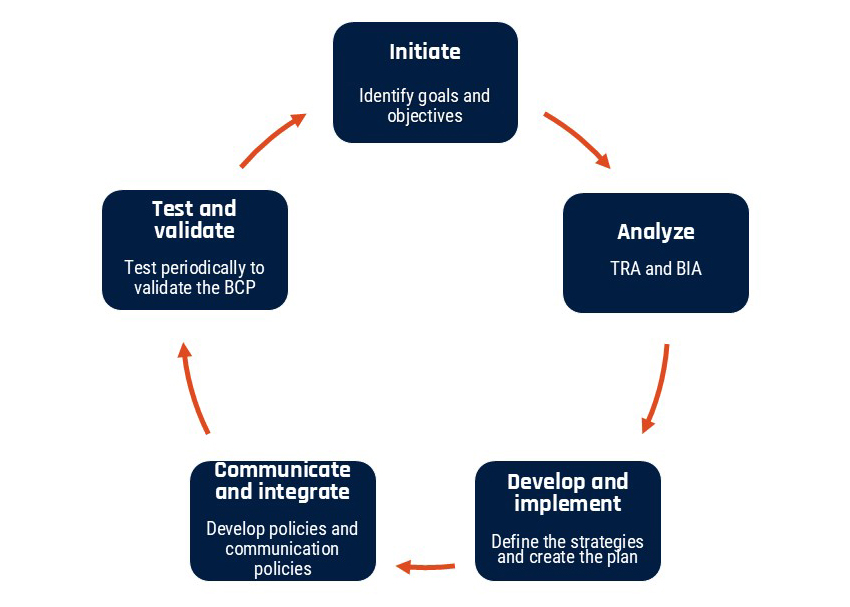
Long description - Figure 1: Business continuity planning lifecycle
Business continuity planning lifecycle describes the 5 steps in the business continuity planning lifecycle
- Initiate: Identify your organization’s goals and objectives
- Analyze: Conduct a TRA and a BIA
- Develop and implement: Define the strategy, develop the plan, and implement it
- Communicate and integrate: Communicate your BCP to employees, stakeholders, and partners and integrate it into your organization’s policies
- Test and validate: Test your plan regularly to ensure that it remains effective and current
The following section describes the 5 stages of the business continuity planning lifecycle.
3.2.1 Initiate: Identify the plan's objectives, goals and response
The main objective of a BCP is to ensure that there is minimal disruption to critical business functions in the event of a disaster or incident. However, depending on your organization's unique requirements and resources, you may have different objectives and goals. Once you have identified your objectives and goals, make sure that they are clearly communicated and accepted by your organization's leaders. Your goals will influence your TRA, BIA, BCP, and recovery strategies.
You will need to identify the key people and processes that will be required to ensure your goals are met. You will also need a communications plan to share these items. Create a management team with members who are knowledgeable about the different operational areas of your organization to evaluate what potential threats can lead to various levels of risks to your organization. The makeup of your team depends on your business continuity objectives and the size of your organization. There should be a designated leader to ensure that all the actions required to develop, implement, modify, and update the plan are being executed.
3.2.2 Analyze: Perform the required assessments
After you have identified your goals and objectives, you will need to conduct a detailed TRA. It is important that your organization understands where your risks lie and the different threats that could cause interruptions to your business operations. Having this knowledge can help you determine how to reduce, mitigate, and eliminate these risks.
Once your organization has identified possible threats, you should conduct a BIA to identify critical and non-critical business operations and systems and how different threats can impact various business areas. A BIA will identify specific threats that can impact financial and operational performance, employees, supply chains, reputation, and resources. These threats should be analyzed to determine the probability of their occurrence and their level of impact. Mitigation strategies that can reduce the likelihood of occurrence and the severity of impact should also be identified.
Collaboration is key when conducting a BIA. Managers, key stakeholders, partners, and employees should all be involved in the discussions. This will give you a greater understanding of how a disaster may impact other business functions within the organization. Involving stakeholders and partners will also help them understand the risks to their business operations and identify mitigation strategies.
Document all your findings in the TRA and BIA so that you can anticipate the cost and resources that will be needed to recover from a disaster or incident.
To help you with your TRA and BIA, it is recommended that your organization perform a security categorization of your business activities (for example, business processes and related information assets). This helps establish the relative importance of your business activities. At the information system level, security categories of business activities serve as input for establishing security assurance requirements, selecting and tailoring security controls, and conducting TRA activities. Security categorization is a process to determine the expected injuries from threat compromise and the level of these expected injuries with respect to the security objectives of confidentiality, integrity, and availability. The result of this process is a security category for a business activity that expresses the highest levels of expected injury for all 3 IT security objectives. For information and guidance on security categorization, read the Cyber Centre's IT security risk management: A lifecycle approach (ITSG-33).
3.2.3 Develop and implement: Define the strategy and create the plan
Once you have identified the types of risks, threats, and vulnerabilities applicable to your organization, you can begin to develop an effective BCP. Your plan should focus on mitigation strategies for the identified risks that will allow for the resumption of critical business operations. A comprehensive BCP will take each risk identified in the BIA and develop an appropriate response strategy to either minimize its impact on your organization's stakeholders, operations, and assets or to mitigate it. Here are some key best practices to consider when developing your BCP:
- identify the members of the response team and provide detailed description of their roles and responsibilities so that they can react swiftly and efficiently
- develop communication methods and recovery procedures
- identify an alternative work site and an employee relocation plan
- consolidate a list of alternate resources and suppliers
- establish an IT recovery plan with assistance from the Cyber Centre publication Developing your IT recovery plan (ITSAP.40.004)
- establish policies to be implemented during a disaster, emergency, or incident
- determine the budget that will need to be allocated to the various activities in your plan
- identify timeframes in which services and business operations need to be available
- identify the resources that will be required to ensure prioritization and a quick and relevant response
- create reports to share with stakeholders
- provide staff with awareness training and educate them on the various risks and emergency preparedness and response strategies
- document the plan, validate it, share it with management and organization leaders, and gain their approval
- store the documented BCP in a secure location that is accessible if the BCP is enacted
3.2.4 Communicate and integrate: Develop policies and communication protocols
Once your BCP has been developed, it should be communicated to your employees and stakeholders and integrated into your organization's policies. It should be easily accessible to allow the response team to best coordinate their efforts. You should also develop a detailed communications and external public relations plan to provide guidance on how to communicate with staff, investors, and the media to avoid the spread of misinformation.
Your BCP should include effective communication strategies for both internal members and external stakeholders. Clear communication within your organization during a crisis will reassure your employees that you are taking the required steps to respond and recover. Communication with external stakeholders, suppliers, and customers is also vital to minimize reputational damage and to maintain your organization's integrity.
The communication process should include protocols and procedures to ensure that the appropriate protective actions are taken and the right people are being alerted. Pre-drafted messages can facilitate and speed up communication in the event of a crisis.
3.2.5 Test and validate: Periodic testing to validate your plan
The risks to your organization are not static and are likely to change over time. Your business operations and priorities may also change. As a result, your BCP must be re-evaluated and tested regularly so that it remains effective and updated. A robust BCP requires continuous improvement with ongoing analysis, testing, validation, and implementation. You should conduct simulations and live exercises to assess your response team's level of preparedness and to identify weak points. You can choose from various types of exercises to test your plan, such as seminars, tabletop exercises, and live exercises. Use the lessons learned from your exercises and tests to update your BCP. A checklist to ensure that each part of your plan is working properly is also beneficial.
Your BCP testing practices should:
- evaluate awareness and training information and protocols. Ensure that protocols are current and that regular training sessions are offered to employees and response team members
- test, evaluate, and validate the technical solutions and steps identified in the BCP. Ensure that solutions and steps are still effective and update them if required
- test, evaluate, and validate the recovery procedures established in the BCP. Ensure that the procedures are aligned with your organization's current operational and business requirement and threat landscape
4 Disaster recovery plan
A DRP looks at every aspect of your organization that might be affected, such as assets, infrastructure, human resources, and business partners. Your DRP should identify your critical and non-critical business operations. It should include recovery requirements, procedures, and detailed instructions for each critical function. This will ensure the protection of assets and business operations to meet regulatory requirements and minimize downtime.
The DRP should define strategies to minimize the impact of a disaster and to recover IT assets and services as quickly as possible to ensure continuation of critical operations.
A disaster, regardless of its nature, can have devastating impacts on your organization. The longer the recovery time, the greater the potential damage. Therefore, it is important to have a good DRP that will ensure a quick recovery, regardless of the type of disaster.
A DRP should be organized by type of disaster and location and should provide step-by-step instructions that can be easily implemented.
The Cyber Centre's publication Developing your IT recovery plan (ITSAP.40.004) identifies important elements and steps that can assist with the development of your DRP. It also describes how a recovery plan can improve your organization's overall resilience and cyber security posture. Consulting other resources to develop your DRP, such as IBM's Disaster recovery plan template or SO/IEC 27031:2025 Information technology — Security techniques — Guidelines for information and communication technology readiness for business continuity can also be beneficial.
In the next section, we will describe the key elements of a DRP. As previously mentioned, there are some similarities between an IRP and a DRP. Although there will be some repetition in the next section, it is important to reiterate these key elements as they shape the DRP.
4.1 Key elements of a disaster recovery plan
In this section, we will discuss specific areas that your organization will need to address when developing a DRP. These steps will return your organization to full operations after a disaster.
4.1.1 Create a disaster recovery team
The goal of the disaster recovery team is to assess, document, and respond to incidents; restore systems; recover information; and reduce the risk of the incident reoccurring. The plan should clearly identify the name and contact information of the individuals who are responsible for the different areas of the disaster recovery process. This will help streamline communications once recovery efforts are underway.
The team members should be well trained on disaster recovery and should understand their respective roles and responsibilities. Members should have various qualifications and cross-functional support from other business lines. Since incidents are unpredictable and require immediate response, designate backup responders to act during any absences when an incident occurs. Critical responsibilities include:
- identifying a plan owner who will lead the recovery process with the support of organization leaders and managers
- building a communications plan that addresses key considerations for communicating essential information to key stakeholders and the media
- implementing systems backup and maintenance to ensure business continuity
4.1.2 Maintain an inventory of all your IT assets and identify the most critical
To have an effective DRP, you will need to maintain an accurate and up-to-date inventory of your IT assets. Your inventory should include a list of hardware, software, and information assets, as well as their location. Your assets should be categorized based on their criticality to your business operations. Your most critical assets include sensitive and proprietary data, and assets that are mandatory for your business operations. The criticality should be compared to the risk probability and resiliency of the asset when faced with disasters. This will allow you to better anticipate and manage risks.
Your organization should rank assets from most critical to least critical to define the scope of your DRP. Ensure that your DRP addresses your critical high-risk assets first, including your sensitive data. Sensitive data may be subject to compliance requirements, such as the Privacy Act, which governs the Government of Canada, or PIPEDA, which covers how private sector organizations handle personal information. Your DRP should identify how your sensitive data will be protected and securely backed up.
4.1.3 Understand the risk tolerance of your organization
To support your disaster management and recovery efforts, you should identify and document the potential risks to your organization and your tolerance to these risks. When you understand your risk tolerance, your organization will be better equipped to develop recovery strategies for various disasters. Your DRP should include various events, such as natural hazards, power outages, cyber attacks, ransomware, insider threats, and failure of critical equipment.
Here are a few key actions to help identify your risks tolerance:
- list your critical business operations
- understand your business operations that handle sensitive data
- identify the assets, including data, that are valuable to your organization
- know your geographical location and infrastructure; this will help you determine whether you need cloud backup, one or multiple storage sites, and backup servers
4.1.4 Identify critical operations
Your DRP should identify what business operations are considered critical to your organization. To help identify your critical operations, consider the following questions:
- What components of your business are so important that your organization will not survive if immediate access is removed?
- What sensitive information or data do you store that, if lost or compromised, you would likely face legal repercussions and reputational damage?
- What patents, intellectual property, or proprietary business information do you need to safeguard to maintain your reputation in the industry and to protect your business?
By understanding what is most valuable to your organization, you will be better equipped to implement strategies in your DRP that will ensure your organization remains resilient in the event of a disaster.
4.1.5 Develop disaster recovery procedures
A major component of a DRP is documented in step-by-step recovery procedures. These procedures will describe how your organization will respond to various disasters. When faced with unexpected catastrophic events, your organization will have very little time to react. Having documented disaster recovery procedures will ensure that your response team knows exactly how to respond to minimize the damage and avoid prolonged downtime. These procedures should cover, at a minimum, the following elements:
- emergency response procedures will include the steps required to effectively respond to emergency situations, to help minimize damages to your organization, and to protect your employees
- business operations backup procedures will ensure minimal disruption to your organization's critical business operations
- procedures identifying disaster recovery actions will help your organization restore your operating environment, including systems, networks, devices, and important information and data following a disaster
4.1.6 Identifying recovery time objective and recovery point objective
Recovery time objective (RTO) and recovery point objective (RPO) are the metrics used to determine your downtime and data loss tolerance, respectively.
RTO is the pre-established maximum amount of downtime your organization can tolerate without causing damage. This can be measured in minutes, hours, days, or weeks. RTO is the planned time and level of service needed to meet the system owner's minimum expectations.
You will need to create different RTO categories since some business operations will require shorter recovery time and some may be less critical for the survival of your organization. Important factors to consider when establishing RTO include:
- cost-benefit analysis related to restoring operations
- cost for mitigation
- level of complexity of the recovery process
- time and resources required to return to normal operations
- critical asset ranking and risk prioritization for strategic recovery
RPO is the maximum amount of data your organization can tolerate losing before causing impactful harm. RPO is measured in units of time. It is basically the amount of time from the start of the outage to your last valid data backup.
For some organizations, data turnover may be low and an RPO of days or even weeks may be tolerable. For organizations with a high data transaction volume, hours or even minutes of missing data may be intolerable. The RPO can be used as a metric to understand how frequently and where you should be backing up your important data and information. Some transactional databases may be configured to synchronously copy data to disaster recovery sites. This ensures no data is lost, but results in significantly slower transaction speeds and considerable expense.
When considering the business impact of a disaster, the sum of the time between the RPO (back in time from the disaster) and the RTO (forward in time from the disaster) gives an idea of how much lost business is designed into the DRP. RTOs and RPOs should be reviewed and updated regularly since they are likely to change depending on the threat landscape and any changes to your business objectives and operations.
4.1.7 Establish a disaster recovery site
A DRP should indicate where your organization's assets will be relocated if a disaster occurs. Recovery sites are usually in remote locations. They are used to help restore IT infrastructure and other business-critical operations during an incident.
It is important that you document the various characteristics of these physical facilities, including location, heating, cooling, power, fire response, and security controls.
Establishing a recovery site can be costly. If your organization lacks the financial resources to have its own recovery site, consider engaging a service provider that can host your remote infrastructure, provide a DRP in cloud, or provide Disaster Recovery as a Service (DRaaS). We will expand on these options in the next section.
There are 3 types of disaster recovery sites to choose from, depending on your business priorities.
4.1.7.1 Hot sites
A hot site is a fully functional backup site with the same IT infrastructure as your primary site. It functions the same as your primary site and is always kept running in case of downtime. Data synchronization is ongoing to reduce the risk of data loss. The benefit of a hot site is that it can nearly eliminate downtime.
4.1.7.2 Warm sites
A warm site is a back-up site with network connectivity and some equipment installed. A warm site requires setup time before it can function at full capacity. Data synchronization occurs less frequently, which can result in some data loss.
4.1.7.3 Cold sites
A cold site is used to store backups of systems or data, but with little equipment installed. More time and resources will be required to set up and restore business operations. Data synchronization can be a difficult and lengthy process, and there is a higher risk of data loss if servers need to be transferred from your primary site to the cold site.
4.1.8 Test and maintain your disaster recovery plan
Your organization should test your DRP regularly to ensure that your documented procedures are effective and up to date. A DRP is an ongoing process that must be reviewed continuously to ensure it aligns with changes to your risk environment, business operations, and technologies.
By testing your DRP regularly, you can ensure that you meet your response goals while identifying any areas that may need improvement. By testing your plan, you can:
- verify the effectiveness of the recovery documentation and recovery sites
- provide reassurance that your organization will be able to withstand disasters
- ensure that your data is being replicated correctly and can be recovered easily from your backups
- review lessons learned from past incidents and include additional mitigation actions in your DRP
- flag areas in the DRP that need updating
- update training requirements for your response team to ensure they are informed of changes and are well prepared to implement the DRP
There are several types of DRP tests you can use:
4.1.8.1 Checklist testing
Checklist testing will ensure that the recovery procedures are comprehensive and account for all the resources and response members that are required to execute each step of the plan.
4.1.8.2 Tabletop testing
The main purpose of a tabletop test is to ensure that your response team understands the processes and procedures in your DRP and that they are aware of their responsibilities and roles. Tabletop testing will allow all response team members to meet and discuss a simulated disruption. They can discuss the actions required to manage the fine details of the disaster, including the aftermath. This will help ensure that all necessary resources are available as indicated in the DRP. A tabletop test will also determine if your DRP is efficient and will reveal strengths and flaws, which will allow you to address any issues with the DRP before an actual event occurs.
4.1.8.3 Walkthrough testing
A walkthrough test is a dry run test to help identify any issues. It is a step-by-step review of the DRP to ensure that the response team members understand their roles, are aware of all the steps of the plan, and have been updated on any changes to the plan since the last review.
4.1.8.4 Parallel testing
A parallel test is when a recovery system is used to restore a system without interrupting any business operations. This is a step-by-step review of each plan component and will help identify gaps, weaknesses, or overlooked details that might present roadblocks during real execution.
4.1.8.5 Full interruption testing
A full interruption test is the most disruptive test. The main system is taken down and the response team attempts to recover it. This is a more thorough and time-consuming test. It is also risky since it can lead to disruptions to business operations and expensive downtime. In some cases, this type of test may not be feasible due to public safety or regulatory concerns.
4.1.8.6 Simulation testing
A simulation test will help the response team know what to do when a disaster occurs. It involves role-playing the DRP based on a specific disaster scenario. It should incorporate all steps in the DRP and ensure that the documented procedures are clear with no ambiguity.
4.2 Types of disaster recovery strategies
In the previous section, we discussed setting up disaster recovery sites to help protect your organization's IT infrastructure and critical operations. We listed the 3 types of disaster recovery sites (hot, warm, and cold) to choose from, based on your business priorities, resources, and risk tolerance. Aside from these options, there are several other disaster recovery strategies to choose from depending on your organization's IT infrastructure, business operations, resources, budget, and critical assets. Here are some examples of backup and recovery methods you can explore.
4.2.1 Network disaster recovery
Network connectivity is critical for your organization's external and internal communication, application access, and data sharing. Network disaster recovery procedures specify how network services will be restored in the event of a network disruption, what resources will be required, and how access to backup data and storage sites will be ensured. Depending on your organization's requirements, your network disaster recovery may include recovery procedures such as:
- local area networks (LAN)
- wide area networks (WAN)
- wireless networks
- network-based applications and services
- failed devices that can lead to network interruptions, such as routers, switches, gateways, modems
There are various reasons why network disruptions can occur, including human error, natural or physical disasters, and cyber attacks like DDoS.
4.2.2 Virtualized disaster recovery
Your organization can use virtual machines in an offsite location or the cloud to back up certain operations or data, or even to replicate your entire IT infrastructure (servers, storage, operating systems, software, applications, and data). Using virtualization for disaster recovery can offer the following benefits:
- automate some disaster recovery processes and allow online operations to be restored faster
- reduce your IT footprint
- support frequent replication and enable seamless failover
- allow your infrastructure to operate from any location
4.2.3 Disaster recovery in the cloud
Disaster recovery in the cloud offers services and strategies to store backup data, applications, and other resources in cloud storage rather than in a physical location. Disaster recovery in the cloud can be more than just a backup solution, it can provide automatic workload failover to the cloud platform so that organizations can restore their backups to either on-premises or cloud environments. This enables business continuity and quick recovery when disruption occurs.
Disaster recovery in the cloud automates many recovery processes and can be scaled to meet business requirements. It is commonly offered as a software as a service solution and can be a more affordable option for organizations with limited financial resources.
Using disaster recovery in the cloud offers the following additional benefits:
- flexible pricing models, such as on-demand or pay-as-you-go
- no single point of failure when using the cloud since you can pay to back up data across multiple geographical locations
- lower disaster recovery capital costs since you will not need to purchase duplicate hardware or software or a physical backup site
- enhanced compliance with regulatory requirements
- assurance that your business operations will be restored with minimized data loss, in accordance with your service level agreement (SLA)
4.2.4 Disaster recovery as a service
DRaaS is disaster recovery hosted by a third-party service provider or public cloud infrastructure. It is a solution that enables replication and hosting of physical or virtual servers, allowing failover for on-premises or cloud computing environments.
Depending on the SLA between the DRaaS provider and the customer, the following solutions can be acquired:
- monitoring, implementing, and managing the entire DRP and helping clients recover their IT infrastructure and return to normal business operations
- ensuring guaranteed recovery times for critical IT resources
- offering backup and disaster recovery tools to customers who want to set up and implement disaster recovery solutions on site
- providing an infrastructure as a service solution, which is a type of cloud service that offers essential computing, storage, and networking resources on demand, on a pay-as-you-go basis
4.2.5 Backup as a service
Backup a service is a service offered by a third-party provider and is also known as online backup or cloud backup. The service provider can store your data remotely in the cloud and manage all the backup and recovery infrastructure.
4.2.6 Storage replication
Storage replication copies your data in real time from one location to another over a storage area network, LAN or WAN. Storage replication is referred to as synchronous replication since the replication is done in real time. Your organization can also use asynchronous replication, which creates copies of data according to a defined schedule.
5 Summary
The advice provided in this publication is meant to help strengthen your organization's resilience through emergency preparedness. Your emergency preparedness strategy should encompass an IRP, a BCP, and a DRP. While the objectives of the 3 plans differ, they all strive to do the following:
- protect and safeguard your critical assets and business operations
- respond to incidents
- recover from disasters as quickly as possible
Remember that an IRP focuses on a specific incident occurrence and the actions required to respond to the incident, whereas a DRP focuses on restoring your organization's IT infrastructure after a disastrous event occurs. The objective of both plans is to help your organization return to normal business operations as quickly as possible.
The main principles of an IRP and a DRP fall under the umbrella of a BCP. A BCP is a holistic approach to handling disruptions with the objective of maintaining your organization's operations throughout the event lifecycle.
Identifying your organization's critical assets and business operations will help you identify the requirements and guide the plan development process. Through effective planning and practice, your organization will be well prepared, ready to recover, and able to maintain operations efficiently. This will minimize the impacts, interruptions, costs, and damages of any future disruption, incident, or disaster.