
Virtualization is a method of hardware abstraction that allows the creation of software versions of IT systems and services which are traditionally implemented on separate physical hardware. These software versions, or virtual instances, can dramatically increase efficiency and decrease costs. Virtualization uses hardware to its full capacity by distributing its capabilities among many different services.
Before implementing virtualization within your organization, you should understand the associated risks and ensure you protect your network, systems and information. This guidance covers the basics virtualization, how your organization can benefit from it and the potential risks involved.
On this page
- How virtualization works
- What virtualization can do for your organization
- Types of virtualization
- Benefits of virtualization
- Risks of virtualization
- What to consider when selecting a hypervisor vendor
- How to mitigate the risks of implementing virtual technology
- Learn more
How virtualization works
To run your systems and services virtually there are 3 main components.
Virtual machine
With virtualization, you can run your applications on fewer physical servers. Applications and software run virtually on a simulated computer system called a virtual machine (VM). The VM has all the features of a computer server, without needing the physical hardware attached. A hypervisor supports the VM.
Hypervisor
The hypervisor provides the layer of abstraction between the underlying hardware and hosted virtual machines. An abstraction layer can hide or show as much detail about your system as you want. The hypervisor allocates resources, such as centralized processing unit access, storage and memory, to multiple VMs. This allows them to run concurrently on the same underlying hardware as though they each had their own dedicated hardware.
The use of hypervisor technology may allow for quicker builds and snapshots of VM images. The administration of the hypervisor should be done using a dedicated administrator workstation (DAW). DAWs are limited-use workstations that can only be used by those who have privileged access to perform administrative tasks. They are meant to increase the security of your network.
There are 2 types of hypervisors:
- bare-metal hypervisor (also known as Type 1), which runs directly on physical hardware
- hosted (also known as Type 2), which runs as an application on a host operating system
Hypervisor technologies may also provide additional functionality or features such as the use of VM snapshots and backups, virtual networking capabilities between VMs, VM monitoring and more. Note, that the use of a hypervisor may incur additional overhead.
Hardware servers
A single hardware server may support multiple VMs. Without virtualization, idle applications have resources that are unused, for example:
- processing power
- RAM
- storage
With virtualization, hardware servers can be used at full capacity to offer the hypervisor all the resources necessary to support the VMs.
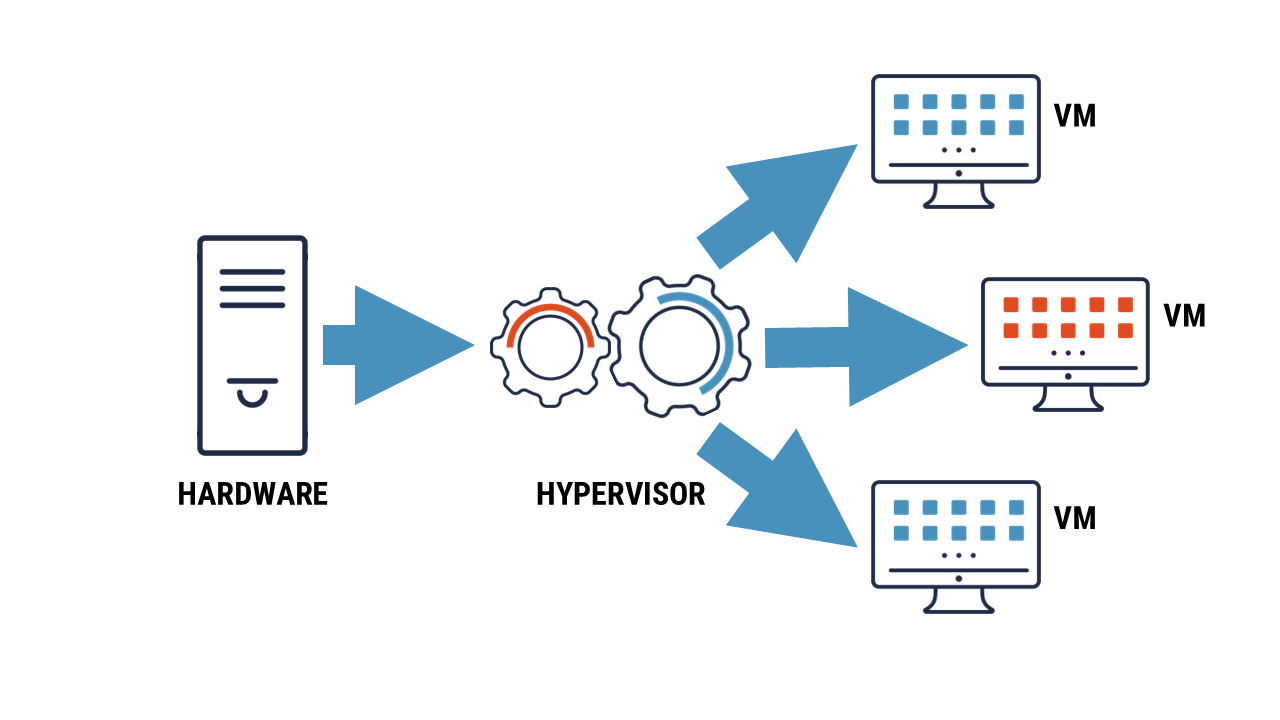
Long description – Figure 1: Hardware server supporting a virtual machine
The figure 1, shows how the hardware server supports the hypervisor and the virtual machine. The image shows 3 components, from left to right, the hardware server connects to the hypervisor and then to the virtual machine(s).
What virtualization can do for your organization
Using virtualization, your organization can advance the performance of its infrastructure in the following ways:
- run multiple operating systems on one physical machine
- divide system resources between VMs, also known as load balancing
- gain advanced resource controls
- create virtualized security appliances, such as a firewall
- easily move, copy and save VMs to other files and systems
- run virtual desktop infrastructure in-office and remotely
Types of virtualization
Virtualization can be used to perform several different functions for different needs. Your organization may choose to use all or some of the following types of virtualization.
Server
A physical server is divided up into multiple virtual servers. Each virtual server can run its own operating system. This is effective for deploying IT services within an organization.
Desktop
A workstation is virtualized so that users can access it from anywhere. This includes accessing your organization’s network from a smart device and working remotely. To learn more about workstation virtualization, read our guidance on using virtual desktop at-home and in-office (ITSAP.70.111).
Storage
All your physical data storage units are combined to create a large, virtualized unit. This streamlines storage capabilities and creates a central storage console.
Network
A hardware-based network is transformed into a software-based network. This consolidates all the network resources and simplifies administrative control.
Application
Computer programs can run on various operating systems (OS). An application is installed on an underlying OS, but through virtualization can be accessed and executed on others, such as running a Microsoft application on a Linux OS. This requires a virtualization layer to be inserted between the OS and the app.
Cloud computing
While virtualization is closely related to cloud computing, they are not the same concept. However, cloud computing utilizes virtualization to support many of its functions. To learn more about cloud computing, read our guidance Thinking of moving to the cloud? Here’s how to do it securely.
Benefits of virtualization
Virtualization and the use of VMs have several benefits. These examples are not inherent capabilities of virtualization but may be achieved depending on how you use it:
- lowers costs for high performance IT services
- increases IT productivity, efficiency and responsiveness
- accelerates the installation of applications and implementations of resources
- minimizes network downtime
- decreases disaster recovery time
- simplifies data centre management
- segregates applications and data to enhance security and reliability
- creates environments to safely test applications
Risks of virtualization
Your organization can introduce security vulnerabilities if you do not properly configure or secure virtualization technology. Risks may include the following:
- vulnerabilities can be introduced by obsolete and unpatched servers (known as VM sprawl)
- sensitive data can be compromised by moving VMs
- entry points, like external access to the device, can be exploited when a VM is offline and dormant
- hardware can be compromised by malware that spreads from VMs or hypervisors, such as VM escape
- unauthorized access may be permitted due to virtual separation not offering the required isolation for security baselines, such as privileged access
- control and visibility can be lost within the virtual environments or networks if traditional security devices are used
- resources can be exhausted if a hypervisor is compromised or if unauthorized changes are made to configurations
- protection for each VM is more time consuming as each VM as
- each VM requires unique considerations and configurations
- each VM runs individually from the core structure
- denial of service attack that affects one VM can affect all connected VMs unless quickly isolated
What to consider when selecting a hypervisor vendor
You should choose a hypervisor vendor that can support your organization’s security requirements. Before selecting a vendor, consider the following factors to help support your decision:
- whether the data is encrypted when it is in transit and at rest
- the security controls that the vendor has in place to protect sensitive data
- whether the vendor uses bare-metal or hosted hypervisors
- whether the vendor has monitoring and auditing capabilities
- who has access to the data on the server
- how administrative privileges are controlled
- whether the vendor gives advice and guidance on configuring, deploying, and hardening the virtualized environment
How to mitigate the risks of implementing virtual technology
Your organization can mitigate some of the risks associated with implementing virtual technology by taking the following 15 actions:
- Select a trustworthy and reliable vendor
- Update and patch servers frequently
- Have your IT team separate the different areas of your virtualized environment (e.g. public, storage, management) into network zones for better control
- Store highly sensitive data on separate physical servers
- Test high-risk applications in isolated environments
- Apply the principle of least privilege to ensure users only have enough privilege to carry out their job functions
- Use separation of duties to break down processes or tasks into a series of steps to reduce the likelihood of mistakes or malicious activity
- Implement multi-factor authentication for all accounts
- Train employees on cyber security best practices and provide role-based training
- Back up your data regularly
- Use a security information and even management approach to business operations to streamline the security of assets
- Install antivirus and intrusion detection or prevention systems on your infrastructure to keep all VMs secure
- Manage your assets take stock of all infrastructure being used and regularly audit and remove unused VMs
- Encrypt network traffic and hard drives anywhere sensitive data is stored to protect data in transit and at rest
- Develop and test an incident response plan
We strongly recommend using bare-metal hypervisors where possible for your organization’s virtualized environments. Bare-metal hypervisors have fewer layers and typically allow for more efficient use of hardware and additional functionality and capabilities compared to hosted hypervisors.
Learn more
- Cyber Centre data centre virtualization report: Best practices for data centre virtualization (ITSP.70.010)
- Cyber security considerations for consumers of managed services (ITSM.50.030)
- Isolating web-facing applications (ITSAP.10.099)
- Top 10 IT security actions items: No.2 patch operating systems and applications (ITSM.10.096)
- Protect information at the enterprise level (ITSAP.10.097)
- Using encryption to keep your sensitive data secure (ITSAP.40.016)